         '\     /`
      ___  \___/  ___      HONEYBEE BASH / BEE.SH
     /   \ (0 0) /   \     _________________________________
    |  M  |  X  |  M  |    AUTONOMOUS MAINTENANCE
    |_____/ @@@ \_____|    QUAD-TIERED RISK MITIGATION
            @@@@@          SIGNATURE + HEURISTIC + LLM
             @@@           _________________________________
              V            SCIKIT PANDA SECURITY RESEARCH
The direct Bash-to-Kernel orchestration tool.
Download HoneyBee Bash
The public part of HoneyBee Bash consists of several scripts and configuration files;- the bee.sh bash main script
- the detector.py python learning script
- the monitor.sh monitor and control tool
- default configuration, profile and ruleset
- model files for local Ollama, Google Gemini
To download, install and configure Bee and the Monitor continue with the below steps.
🐝 1. Prepare
Some systems require preparation for the minimal required linux environment for the HoneyBeeBash installer to fuction properly. Follow the below instructions to verify if the required tools are available to run the installer.ForWindows orAndroid follow the preparation steps before continueing.
Installation requirements
As the next step verify if your system has the tools to download (curl), unzip and convert (dos2unix) the installation package. Select your OS and run the related command. Note that these commands will install the tools if missing.If you are already root then ommit the 'sudo' prefix.WW
Debian / Ubuntu / Linux Mint / Pop!_OS:
Fedora / RHEL / CentOS / Rocky Linux:
Arch Linux / Manjaro:
openSUSE (Leap / Tumbleweed):
Alpine Linux:
Gentoo Linux:
Slackware:
🐝 2. Download
When the download, unzip and convert tools are available the download can be performed.Bee is available on GitHub.
Download HoneyBeeBash from GitHub
You can also download Bee from the shell using;
If GitHub is not available then download from the website;
Download HoneyBeeBash from website
Or from the shell using;
After downloading you can start the installation though a decision has to be made how much autonomy you want Bee to apply when running. The installer will ask you various question including to "Choose the prefered automation mode:".
1) RESTRICTIVE = Automate when whitelisted only
2) PERMISSIVE = Automate if not blacklisted (autonomous mode)
3) ADAPTIVE (standard) = Automate on <10% threat score
4) MANUAL = No automation
On production systems we always advise the ADAPTIVE mode so it can be reviewed and permissions trained manually resulting to a complete training set for autonomous work on your system.
RESTRICTIVE and MANUAL are modes where you do have full control over all execution commands.
PERMISSIVE mode allows for autonomous behaviour where it only skips blacklisted commands.
Once decided on the automation mode continue with Step 3 Installation.
🐝 3. Installation
To install unpack and run the installer to create required directories, files and permissions.
By default, the installer creates a Python virtual environment (venv) located at /opt/honeybeebash/backpack to securely isolate dependencies like Scikit-Learn and google-genai.
To install these packages directly into your global system environment instead, use the --legacy flag during installation.
In short, if you wish to run without a venv then add the --legacy flag during installation.
During installation details like HiveHub username, LAN or Google API information may be asked. These can be skipped and manually configured when obtained either in the bee.conf file or the models/*.conf files.
🐝 4. Testing
Bee performs some self tests though a simple default test action requires only command below.
You can test if Bee is functioning using the below command;
You can also test using a general ask instruction;
To query Bee about system analytics or metrics, append a question mark to the end of your prompt. Bee will evaluate the system environment, consult the configured LLM structure, deliver the analysis, and safely exit.
To run Bee for a default analysis job or to continue the last job you can use;
Bee will run until the goal is completed, told to Quit using the 'q' key or interupted with CTRL+C though interupting is not advised as it may corrupt the dataset file.
🐝 5. Custom configuration
Bee runs with several configuration files that can be altered at will;- bee.conf: The main bee configuration file with model and parameter choices.
- BEE_PROFILE: The Profile config describes the mentality and attitude of LLM responses.
- BEE_RULES: These are the rules given to the LLM to follow during operation of Bee.
- BEE_PLANNING: This will be sent first to the LLM to obtain a plan for the given job.
- DEFAULT_INPUT: This is the default prompt if none given for this job.
- RUN_FORBIDDEN: A list of forbidden command strings.
- RUN_ALWAYS: A list of commandlines that are always allowed.
- RUN_NEVER: A list of commandlines that are never allowed.
- RUN_REPLACE: A list of commandlines that will be replaced runtime.
Bee always uses the main config/bee.conf file.
It applies global RUN rules from $HOME/.config/honeybeebash before job rules.
As last it applies the job RUN rules as stored in the $HOME/.local/share/honeybeebash/workspace/<jobname>/config
🐝 6. Monitor
For each job Bee creates a directory in workspace with the exact job name.
This directory contains output that provides details of the job, status and progress.
To review much of what Bee is reasoning or doing you can run the monitor.sh script.
This provides an structured interface to all the logs, various dashboards, Bee activity and
ability to manually approve pending command requests by the monitored Bee.
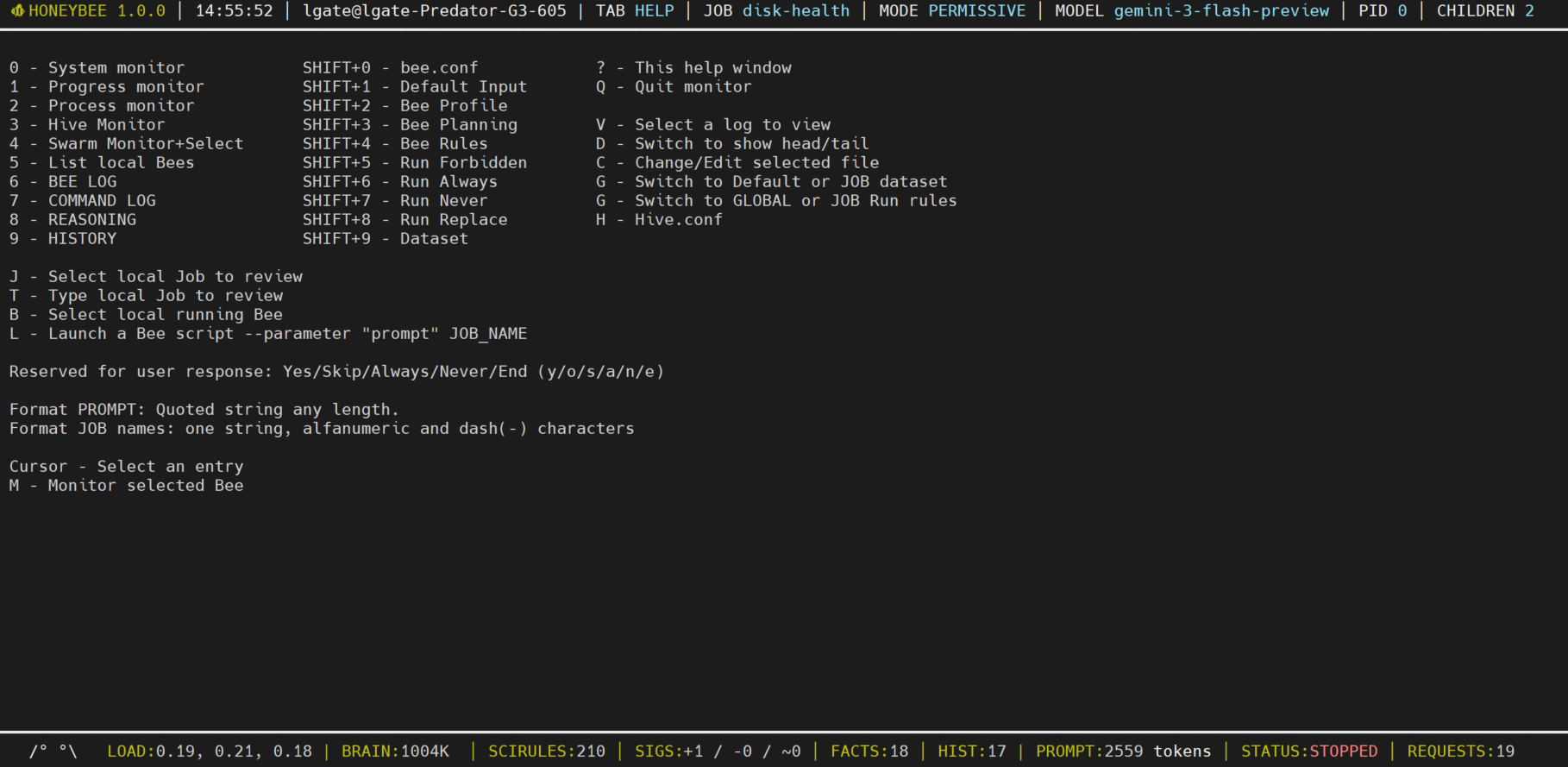
Run the monitor in another shell or with bee in the background.
For help information press '?' after starting the monitor.
🐝 7. Import Ruleset from HiveHub
Bee will install the default analysis job for your distro on first start. This job will be installed into Bee workspace directory.
To obtain more specialized rulesets for various distros and jobsHiveHub
provides filtered and manually reviewed rulesets to use for free.
To import the default version of a job ruleset from Hivehub you can instruct bee with the parameter
--import as shown below;
You can import the default version for a job by omitting the version or download a specific version by specifying it. On HiveHub you can obtain the exact command for a package to download and install it. Below are some examples.
The system will detect your distro and obtain the related package.
Once the new job dataset is downloaded and installed Bee will continue and run it.
If you just want to import the dataset and review then add the --exit parameter.
🐝 8. Export Ruleset to HiveHub
Once you have found a ruleset that works well for your distro then you can share it with the HiveHub community to apply and improve it even further.
To export/upload a job ruleset to Hivehub you can instruct bee the following parameter;
Or to export a specific version;
You can also share your improved distro global run rules using the following flag;
Note that exporting to HiveHub requires free registration for an API key. This helps us keep the system lean and clean. Register here for a HiveHub account
Bee is in continuous development. Currently LLM support for Ollama and Google Gemini (generative+cloud) are available. More options are following soon.
If you like to support the project please link, contribute, donate or join the discord.

LINK TO US
CONTRIBUTE
DONATE
JOIN DISCORD
If you like to discuss usage, features or other related topics then do join discord for a chat.
[SYSTEM] Initializing HoneyBee Agent...
[HIVE] Link: Detected and signalling
[ALERT] Service 'nginx' is DOWN on Worker 192.168.1.66
✔ Signature Check Passed (Auth: Sysop)
[CMD] Executing: sudo systemctl restart nginx && tail -n 20 /var/log/nginx/error.log
[LLM] Reasoning: "Restart executed. Checking logs for root cause..."