         '\     /`
      ___  \___/  ___      HONEYBEE BASH / BEE.SH
     /   \ (0 0) /   \     _________________________________
    |  M  |  X  |  M  |    AUTONOMOUS MAINTENANCE
    |_____/ @@@ \_____|    QUAD-TIERED RISK MITIGATION
            @@@@@          SIGNATURE + HEURISTIC + LLM
             @@@           _________________________________
              V            SCIKIT PANDA SECURITY RESEARCH
V 1.0.7 | STABLE
The direct Bash-to-Kernel orchestration tool.
# bee.sh --debug
🐝 Bee's internals
The bee.sh script is a looping mechanism that provides an LLM with a profile, rules, main goal, task steps and progress.The script loops through the following steps;
- prepare a workspace directory for the named (or default) job
- provide the LLM with an instruction to plan the given job
- provide the LLM with a informational and task prompt
- validate and (auto) approve the given command
- output response, progress, status into the job directory
- loop until the initial goal is completed
🐝 Bee's workspace
Bee outputs a bundle of data which is stored in various files in its job based workspace, this is refered to as the job directory. The files in the job directory are seperated from other 'job' data.| GOAL | The initial goal of the job. |
| ADDITIONAL | For additional follow-up instructions. |
| PLAN | The plan summarized by the LLM. |
| FOCUS | A summary of the focus, goal, planning, input and result, next step and explanation. |
| BEELOG | A log of Bee's decorated response output to the user. |
| HISTORY | A history of commands and responses. |
| JOURNAL | A Journal of each focus for in-depth review. |
| COMMANDLOG | A log of executed commands during the job. |
| PROMPTLOG | A log of sent prompts to the LLM. |
| NEXTACTION | The next command proposed by the LLM. |
| REASONING | A summary of commands and the reasoning of the LLM. |
| TASKSCOMPLETED | A summary of completed tasks during the job. |
| EXPLANATION | The last given explanation by the LLM. |
| LASTPROMPT | The last send prompt. |
| FACTS | Job related facts found during the job. |
| LOG | A full log of prompts send and LLM response JSON. |
| config/ | The configuration for this job with its own Run ruleset. |
| cache/ | The Sci-Kit learning model to detect harmful commands. |
| memory/ | A designated long-term memory directory for the LLM. |
| tmp/ | A temporary workspace directory for the LLM. |
🐝 LLM Prompt structure
The LLM prompt is a basic compilation of related data.### SYSTEM INSTRUCTIONS
### ENVIRONMENT
### Initial GOAL and PLAN
### TASKS COMPLETED SO FAR
### TASK / FOLLOWUP
### COMMANDS EXECUTED SO FAR
### FOUND FACTS
### LAST COMMAND
### RESULT OF LAST COMMAND
The contents are filled in per cycle from data gathered from the job directory as well as internal rundata.
If the total prompt as such becomes too large for the configured context window then a reduced prompt is automaticly applied for Bee to continue its job.
🐝 Bee Profile and Bee rules
Bee is instructed to act a certain way and to provide output matching the conditions in the Bee rules.The following files contain the related Bee profile and Bee run rules;
- BEE_PROFILE: The characteristic profile of Bee.
- BEE_RULES: Instructions of rules for Bee to follow during a job.
- BEE_PLANNING: Instructions to make a plan before processing a job.
- BEE_DEFAULT: The initial prompt if none given.
For new jobs the Bee profile and Bee rules are copied to the job config directory for specific job customization.
🐝 Global and Job Run Rules
To minimize risk of harmful commands several restrictions are build-in. Using plain text files configuration for commands Bee can detect commands that are allowed or not or to be replaced runtime. After these Run rules Bee consults the Sci-Kit learning model for the known safety weight of the command.The Run rules are divided in Global run rules and Job run rules.
Global Run rules are stored in the main config directory and apply to all jobs.
Job Run rules are stored in the job directory and applied for that job only.
The following files contain the related Run rules
- RUN_FORBIDDEN: A list of forbidden command strings.
- RUN_ALWAYS: A list of commandlines that are always allowed.
- RUN_NEVER: A list of commandlines that are never allowed.
- RUN_REPLACE: A list of commandlines that will be replaced runtime.
Bee always uses the main $HOME/.config/honeybeebash/bee.conf file.
It applies global RUN rules in $HOME/.config/honeybeebash before job rules.
As last it applies the job RUN rules as stored in the $HOME/.local/share/honeybeebash/workspace/<jobname>
🐝 Sci-Kit dataset
After the hard block of undesired commands using the Run rules Bee also applies a machine learning script using vectorized command lines and the RandomForestClassifier method to predict if a command is harmful.The detector.py script runs the training and response to queries. It applies the dataset.csv file stored in the cache/dataset.csv file in the job directory.
Each training rebuilds the vector model which is applied during analysis of the commandline.
Our predictive engine is powered by Scikit-Learn, utilizing the Random Forest algorithm for robust and scalable data classification.
For more information on Scikit-Learn visit;
https://scikit-learn.org/ [Modified BSD License]
🐝 Manual command approval
When Bee finds a commandline that it cannot deny or approve using the Run rules and neither using the Sci-Kit trained model it will prompt the user to respond.Responses
- Yes, allow the commandline this time. If repeated often the trust in this commandline grows.
- Once, execute the command but do not train on it. Useful to explore.
- Skip, skip the commandline for now. If repeated often the untrust in this commandline grows.
- Always, approve the commandline for always.
- Never, deny the commandline for always.
- Replace, enter a replacement command for this commandline to apply runtime.
- Follow-up, allow the user to add a follow-up instruction.
- Quit, this halts Bee immediately.
Note that the Monitor features command approval allowing the user to respond to manual approval requests with Yes, Once, Skip, Always, Never and End to end the Bee. For the other responses shell input is required for now.
🐝 Bee Monitor.sh
The Bee monitor is available for free to review the state and progress of Bee's on your machine.Workspace data of Bee is stored in separated job directories. For new jobs the default global dataset is copied.
The monitor reads these files and presents them in various formats for monitoring the state and progress of a job.
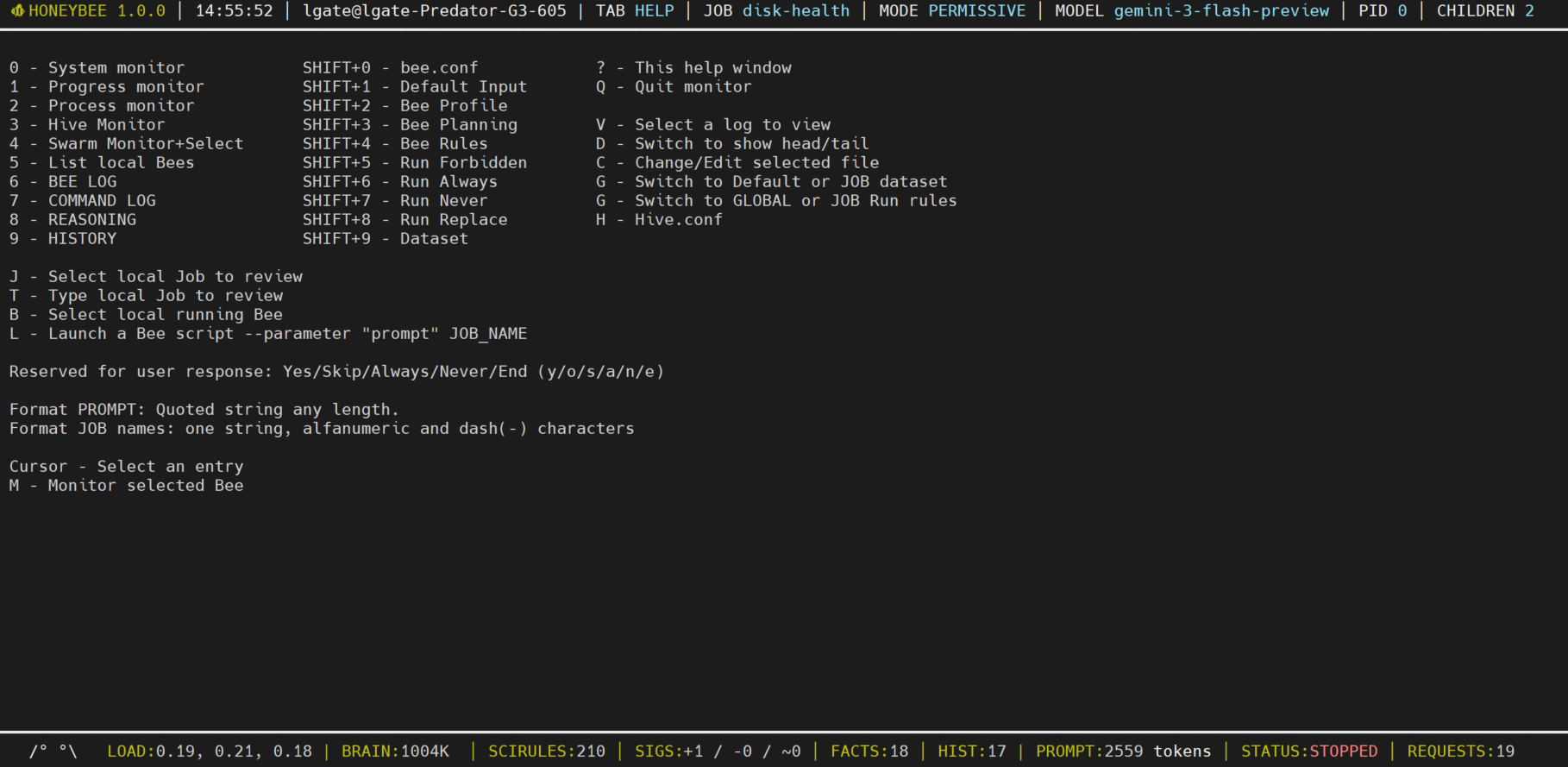
Monitor features:
- A key-bind help screen (press ?)
- Monitor system state
- Monitor Bee Progress and Process
- Answer manual approval requests
- Launch Bee's on the local machine
- View the Bee log for activities
- View the chain of reasoning
- View the training dataset
- View the Run Rules
- View the Job logs
- Edit any of the above files
Monitor Hive features [requires upgrade]:
- View the Hive configuration
- Select a Hive cluster
- Select a Bee in a cluster
- Launch Bee's across the Hive
- Scheduling of Bee jobs
- Auto control of Bee's
HoneyBee System model
To provide some oversight of the HoneyBee system find below a simplified diagram that reflects the components and their interaction;Bee operates on a feedback loop where AI-driven logic is constrained by rigid, heuristic safety boundaries.
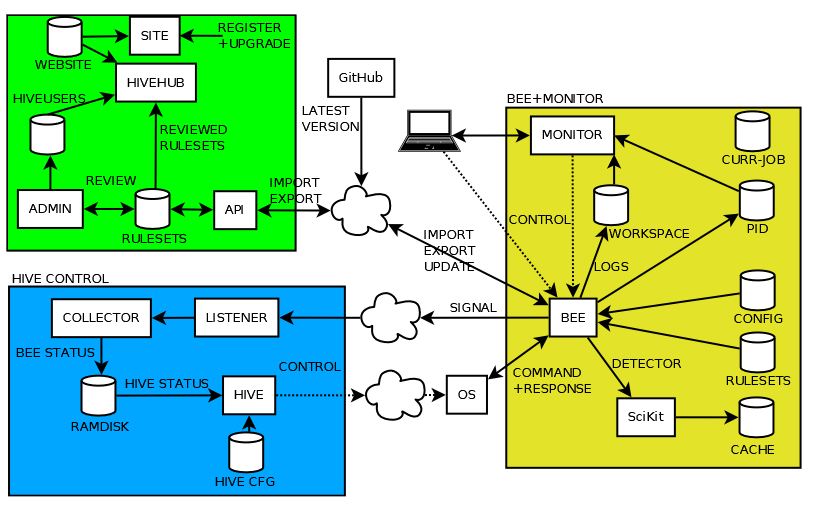
Hive Hub:
Hive Hub is where users of Bee can share and download datasets for various distro's and jobs.
Hive Control:
To make managing multiple Bee's (your swarm) across your network easier a QueenBee tool is made. This tool listens using the collector.sh tool and keeps track of the status of each Bee listed in conf/hive.conf. This allows for managing a swarm of bee's from the QueenBee's handler.
Note that the Hive components for managing clusters of systems require you to Upgrade for a Hive license key.
# bee.sh
[SYSTEM] Initializing HoneyBee Agent...
[HIVE] Link: Detected and signalling
[ALERT] Service 'nginx' is DOWN on Worker 192.168.1.66
✔ Signature Check Passed (Auth: Sysop)
[CMD] Executing: sudo systemctl restart nginx && tail -n 20 /var/log/nginx/error.log
[LLM] Reasoning: "Restart executed. Checking logs for root cause..."